Prompt engineering for code comes down to three things the official Anthropic, OpenAI and Google guides agree on: a specific task (the file, the symptom, what "done" looks like), a check that comes back pass or fail (a test, a build, a linter), and the project's standing context in a file such as CLAUDE.md. Below is what each set of docs actually says, before-and-after prompt pairs, and templates for coding agents and Claude function calling.
Updated October 31, 2026. Every quote and example was checked against the documentation on that date; links to the sources are in each section.
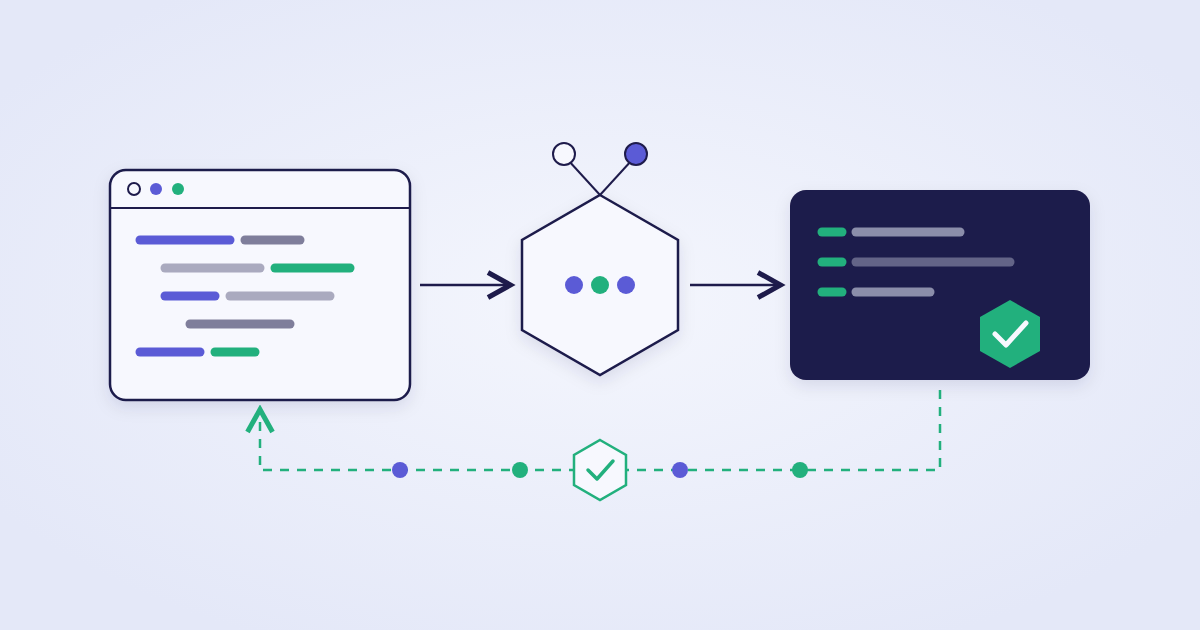
The prompt loop for code: the agent repeats the edit and the check until the result passes, then shows the command output.
What the three official guides say about prompting for code
All three companies publish their guidance openly, and on the essentials they agree: the model needs a specific task, a way to check the result and the context that is missing from the code. The emphasis differs. Anthropic writes the most, because Claude Code is a product with its own documentation. OpenAI keeps its coding advice in one section of the prompt engineering guide, and Google folds it into the general prompting principles for Gemini.
Prompting for code in the official documentation (checked October 31, 2026)
Question
Anthropic (Claude, Claude Code)
OpenAI
Google (Gemini)
How to state the task
Name the file, describe the symptom, say what "fixed" looks like
Frame the model as a software engineering agent with well-defined responsibilities
Be precise and direct; skip unnecessary or overly persuasive language
Checking the result
A test, build, linter or screenshot; ask for the command and its output
Test changes with unit tests; validate applied patches
Enable code execution for any arithmetic, counting or calculation
Standing context
A short CLAUDE.md, path-scoped rules, skills
Developer instructions in the developer message or the instructions parameter
GEMINI.md files in Gemini CLI; the name can be switched to AGENTS.md
Long code and documents
Documents at the top of the prompt, the question at the end
Context is usually best placed near the end of the prompt
All the context first, instructions and question at the very end
Reasoning depth
The effort level; "think step by step" is ordinary text
Reasoning models do better with high-level guidance
For hard problems, "Think very hard before answering" can help
Sources: Best practices for Claude Code, Anthropic Prompting best practices, OpenAI Prompt engineering, Google Prompt design strategies.
How to state the task: before-and-after pairs from the docs
A specific prompt works better because it gives the agent information the repository does not contain. Anthropic puts it this way: if you name the file, describe the symptom and say what "fixed" looks like up front, you usually save yourself a round of corrections. The first two examples come from the Claude Code docs, the third from Anthropic's general prompting guide.
Instead of:
fix the login bug

Try:
users report login fails after the session times out. look at token refresh in src/auth/, write a failing test that reproduces it, then fix it
Instead of:
add a calendar widget

Try:
follow the pattern in HotDogWidget.php and build a calendar widget that lets you pick a month and page between years. no new libraries
Less effective (Claude will only suggest):
Can you suggest some changes to improve this function?

More effective (Claude will make the changes):
Change this function to improve its performance.
Hand it over instead of describing it. Type @ and a path to include a file, paste a screenshot of the design or the error, pipe command output in with cat error.log | claude -p "what's going on here".
Say how much you want. Claude tends to read a request conservatively and build the smallest thing that satisfies it. For the fuller version the docs suggest "be ambitious" plus a list: empty and error states, the save flow, keyboard navigation.
When the task is still fuzzy, ask Claude to interview you until it could write the spec, then save it to SPEC.md. Anthropic recommends building from it in a fresh session with a clean context and a written definition of done.
For exploration a vague prompt is fine, such as "what would you improve in this file?". You correct a bit more as you go, and that is the trade-off.
Checking the result: tests, builds, linters and evidence
Anthropic's core advice for code: give Claude something it can run that comes back pass or fail. Claude stops when the work looks done; with nothing to check it against, you become the test suite. With a check in place, Claude makes the change, runs the check, reads the output and fixes what broke before running it again.
The check can be almost anything Claude can read the result of: a test file, a build's exit code, a linter, a script that diffs output against a fixture, a browser screenshot next to the mockup. How strict it is depends on where you put it:
Four levels of checks in Claude Code (per Anthropic's docs)
Where the check lives
What it looks like
Who decides it is done
In the prompt
"run the auth tests after, and keep going until they pass"
Claude itself
A /goal
"/goal all tests in tests/auth pass and lint is clean"
A separate model, after every turn
A Stop hook
A script exiting with code 2 keeps the turn going until, for example, tsc --noEmit passes
Claude Code, deterministically
A review
/code-review in a fresh subagent that never saw your conversation
A reviewer not swayed by the author's reasoning
Whichever level you use, ask for evidence: the command Claude ran and its output, or the screenshot. "All tests pass" on its own tells you very little, and reading the output is faster than rerunning the check. OpenAI's coding guidance makes the same point: tools like apply_patch may return "Done" even on failure, so patches need validating.
A separate trap is coding to the tests. Anthropic's guide has a ready system prompt snippet for it: ask for a general-purpose solution that works for all valid inputs, rule out hard-coded values for specific test inputs, and ask Claude to say so when a test itself is wrong. In the guide's words, tests are there to verify correctness, and the solution itself should follow from the task's requirements.
CLAUDE.md, AGENTS.md and GEMINI.md: what to write down once
Claude Code loads CLAUDE.md into every session, so every line takes a little of Claude's attention on every task. The docs recommend keeping only what Claude cannot work out from the code:
How to confirm work in this repo: the exact test, typecheck and lint commands, and how to run a single test file.
Places where the code is misleading: an old pattern that is everywhere but that new code must not copy.
Decisions that are not in the repo: which error helper the team settled on, how deploys work.
Anything you have had to correct twice already.
# Commands
- Install: pnpm install
- Run one test file: pnpm vitest run path/to/file.test.ts
- Typecheck: pnpm tsc --noEmit

# Conventions
- Use the error helpers in src/lib/errors.ts, never throw raw strings

# Gotchas
- Integration tests need DATABASE_URL set, see .env.example
That example comes from Anthropic's docs. /init generates a starting version, the memory guide recommends staying under 200 lines, and /context confirms the file was loaded. A rule that must never bend ("never read .env", "don't touch the migrations folder") belongs in a hook or a deny rule: Claude follows a CLAUDE.md line nearly every time, while a hook runs every time.
Google's counterpart is GEMINI.md context files in Gemini CLI: a global one at ~/.gemini/GEMINI.md and project ones in the workspace directories and their parents, with /memory show and /memory reload. The context.fileName setting changes the name, for example to AGENTS.md, so several agents can read one file. For unpaid-tier and Google One users, Gemini CLI was replaced by Antigravity CLI on June 18, 2026.
Writing a CLAUDE.md for your own project with three project-specific prohibitions is the task in the lesson An Effective CLAUDE.md.
A system prompt for an agent that writes code
When you build your own agent through the API, its default behavior comes from the system prompt. Anthropic's prompting guide has ready snippets for the usual problems in agentic coding. Take them as they are and test them on your own tasks:
The problem and the system prompt snippet from Anthropic's guide
Problem
What to add to the system prompt
The agent makes claims about code it has not read
An investigate_before_answering block: no speculation about unopened code; read a referenced file before answering
Extra files, abstractions and "improvements"
The over-engineering snippet: only changes that are requested or clearly necessary; no helpers for one-time operations, no handling for scenarios that cannot happen
Coding to the tests
A general solution for all valid inputs, no hard-coded values; report tests that are incorrect
A long task across several sessions
Test status in JSON (for example tests.json), progress notes in progress.txt, git as the log and restore points
Temporary scripts left in the project
Ask Claude to remove temporary files and helpers at the end of the task
Risky actions
A list of actions that need confirmation: deleting files or branches, git push --force, pushing code or posting messages others will see
The anti-hallucination snippet itself, as published by Anthropic:
<investigate_before_answering>
Never speculate about code you have not opened. If the user references a specific file, you MUST read the file before answering. Make sure to investigate and read relevant files BEFORE answering questions about the codebase.
</investigate_before_answering>
OpenAI's coding guidance covers similar ground: frame the model as a software engineering agent, explain how to use code execution tools and when to avoid them (for example, no interactive execution unless necessary), include concrete examples of how to invoke commands, and ask for clean Markdown with file paths, functions and classes in backticks. For production, OpenAI also recommends pinning a specific model snapshot and adding fixtures, tests and evaluation checks before changing a prompt. Building such a test set is covered in the lesson Prompt evaluation: LLM-as-judge and test harnesses.
Claude function calling: the tool description is a prompt too
When you pass a tools list to the API, Claude picks a tool by its name and description. Anthropic's tool use docs call extremely detailed descriptions "by far the most important factor in tool performance". A description should cover what the tool does, when to use it and when not to, what each parameter means and any caveats or limitations. Aim for at least 3–4 sentences per tool.
{
  "name": "get_stock_price",
  "description": "Retrieves the current stock price for a given ticker symbol. The ticker symbol must be a valid symbol for a publicly traded company on a major US stock exchange like NYSE or NASDAQ. The tool will return the latest trade price in USD. It should be used when the user asks about the current or most recent price of a specific stock. It will not provide any other information about the stock or company.",
  "input_schema": {
    "type": "object",
    "properties": {
      "ticker": { "type": "string", "description": "The stock ticker symbol, e.g. AAPL for Apple Inc." }
    },
    "required": ["ticker"]
  }
}
That is the docs' "good" example. In the "poor" one the description is a single line, "Gets the stock price for a ticker.", which leaves Claude with many open questions. Four more rules from the same page:
Complex inputs get examples. The input_examples field takes sample calls; each must validate against the schema, and an invalid one returns a 400 error. A simple example costs about 20–50 prompt tokens.
Fewer, more capable tools. One tool with an action parameter instead of create_pr, review_pr and merge_pr.
Namespace tool names by service, such as github_list_prs and slack_send_message, so the choice stays clear as the library grows.
tool_choice takes auto (the default with tools), any, tool and none. On Claude Opus 5.5 and Sonnet 5.5, any and tool return a 400 error; the docs suggest auto with strict tool use, or structured outputs.
pip install anthropic: a first request with a tool
The Anthropic Python SDK installs with pip install anthropic and needs Python 3.10 or later. anthropic.Anthropic() reads the key from the ANTHROPIC_API_KEY environment variable. A minimal request with one tool, based on the example in the tool use docs:
import anthropic

client = anthropic.Anthropic()  # reads ANTHROPIC_API_KEY

response = client.messages.create(
    model="claude-opus-5-5",
    max_tokens=1024,
    tools=[{
        "name": "get_weather",
        "description": "Get the current weather in a given location",
        "input_schema": {
            "type": "object",
            "properties": {
                "location": {
                    "type": "string",
                    "description": "The city and state, e.g. San Francisco, CA",
                },
            },
            "required": ["location"],
        },
    }],
    messages=[{"role": "user", "content": "What's the weather like in San Francisco?"}],
)

for block in response.content:
    if block.type == "tool_use":
        print(block.name, block.input)
Claude answers with a tool_use block; your code runs the real function and sends the result back as a tool_result block in the next request. Setup with a virtual environment and a .env file is covered in the free lesson First Steps: Installation and Your First Request, and the full tool loop is the subject of the Claude Tool Use Course: Function Calling in Python (6 lessons, from your first tool to a chatbot with several tools).
Advice you can drop from prompts for code
The Claude Code docs have a section on advice that current models have made unnecessary. In short:
Old habits and what to do now (Best practices for Claude Code)
Habit
What changed
IMPORTANT or ALL CAPS on key lines
Current models follow a plainly worded line; piling on emphasis mostly makes Claude over-apply the rule. A rule that cannot bend goes into a hook or a deny rule
"think hard", "be thorough"
Effort is the control; those phrases only nudge Claude within it. ultrathink asks for deeper reasoning on one turn
"Keep going, loop until done, don't be lazy"
Current models carry on through an agreed task; such lines are more likely to cause over-work. A pass/fail check is still worth giving
Describing architecture in CLAUDE.md
Claude reads the repo itself; only write down what is not in there
Managing the context window aggressively
Most current models have a 1M-token window and compact automatically; /clear between tasks still helps
Google gives similar advice for Gemini 3: asking the model to outline its reasoning steps in the response is generally unnecessary, and for a genuinely hard problem a short request to think harder can help, at the cost of extra thinking tokens. For long context the order matches Anthropic's: all the code and documents first, the question at the very end. Google also recommends always including few-shot examples and keeping their format consistent.
Where to practice: Academl courses on prompting for code
Reading the guides gives you the vocabulary; the skill comes from your own tasks. In the courses below every lesson ends with a hands-on task that the AI reviews, with a quiz and an AI tutor, and a certificate with a verification code after all lessons.
Courses on prompting for code: length and what you practice
pip install anthropic, the Messages format, choosing a model, parameters, streaming, vision
Time. At 30 minutes a day, 5 days a week, the Claude Code course takes about 2 weeks and AI Coding fits into one evening. Your real pace depends on how long the tasks take on your own project.
Price. The first 2 lessons of every course are free; sign-up gives 7 days of full access to the whole catalog with no card, then Pro is $9 a month or $79 a year (pricing). Claude Code itself runs on a Claude subscription or an Anthropic Console account, billed separately by Anthropic. The full developer route is the AI for the Developer track, and the general prompt engineering plan is in Prompt Engineering from Scratch: a 4-Week Plan.
FAQ
How is a prompt for code different from a regular prompt?
A prompt for code needs a way to check the result. Anthropic recommends giving the agent something that comes back pass or fail (a test, a build, a linter, a script that diffs output against a fixture) and asking for the command and its output. OpenAI's coding guidance also tells the model to test its changes.
Where is the official documentation on prompting for code?
Anthropic publishes Best practices for Claude Code (code.claude.com) and Prompting best practices (platform.claude.com), OpenAI has a Coding section in its Prompt engineering guide, and Google has Prompt design strategies for the Gemini API. All three are linked in this article.
Should I write think step by step in a Claude Code prompt?
According to the Claude Code docs, phrases like that are ordinary prompt text. The effort level controls how hard Claude thinks, and such wording only nudges it within that level. The word ultrathink still asks for deeper reasoning on a single turn.
What goes into CLAUDE.md?
Only what Claude cannot find in the code: the exact test, typecheck and lint commands, places where the code is misleading, team decisions and anything you have had to correct twice. Anthropic recommends keeping the file short and moving rules that cannot have exceptions into hooks and deny rules.
How do I write a tool description for Claude function calling?
Anthropic calls detailed descriptions by far the most important factor in tool performance: what the tool does, when to use it and when not to, what each parameter means and any limitations. Aim for at least 3-4 sentences per tool and add input_examples for complex inputs.
Does tool_choice any work with Claude Opus 5.5?
On Claude Opus 5.5 and Sonnet 5.5, tool_choice values any and tool return a 400 error. The docs suggest keeping auto with strict tool use to guarantee schema-valid inputs, or using structured outputs.
How do I install the Anthropic Python SDK?
Run pip install anthropic in a virtual environment with Python 3.10 or later and set ANTHROPIC_API_KEY. anthropic.Anthropic() reads the key from the environment, and client.messages.create sends the request. Academl's free lesson walks through it step by step.
Is there a Claude function calling course?
Academl has Tool Use in Claude, a 6-lesson Python course from your first tool to a chatbot with several tools, plus a 10-lesson Claude Code course. The first 2 lessons of every course are free; sign-up gives 7 days of full access with no card, then Pro is $9 a month or $79 a year.
Start today
Open the first 2 lessons of the Claude Code course for free: installation, your first session and how the agent reads a codebase. For AI-reviewed tasks and the remaining lessons, sign up for 7 days of full access with no card, then Pro is $9 a month or $79 a year.